


Payroll mistakes can damage trust quickly. They can also lead to penalties and awkward pay-day conversations. Canada had 1.38 million employer businesses (June 2025), so payroll tools touch a huge number of teams.
If you are searching for the best payroll software Canada, this guide does not just list tools. It shows you how to choose and how to switch safely using a “parallel run” method. That is the difference between a smooth change and a messy week.
What Payroll Software is and What It Does in Canada
Payroll software is a system that runs payroll, tracks deductions, and stores pay records. In Canada, it supports federal and provincial deductions, pay stubs, and year-end outputs your accountant can use. Good payroll software also keeps a clear history of changes, which helps when questions pop up later.
This matters because many owners still run small company payroll from spreadsheets. That can work for a while, but it breaks when you add overtime, benefits, or multiple provinces. If you want payroll software Canada teams can rely on, you need accuracy, approvals, and tidy reports.
Best Payroll Software Choices By Business Type
1) QuickBooks Payroll
QuickBooks Payroll is best when your books already live in QuickBooks. It keeps payroll close to your accounting, so you can see payroll costs without extra exporting or manual entries. It is commonly used by owners who want a familiar setup and a quicker monthly close.
What it does well is standard payroll for employees, regular pay schedules, and clean records that your bookkeeper can reconcile. It is a strong option for payroll applications for small businesses that want less tool switching. If your goal is reliable pay runs with solid accounting alignment, this is a practical first pick.
| Pros | Cons |
|---|---|
| Strong fit if you already use QuickBooks | Can feel limited for deeper HR needs |
| Smooth accounting tie-in | Add-ons may increase total cost |
| Familiar interface for many SMB owners | Advanced reporting may require higher tiers |
Pricing (how to write it in the article): Published subscription plans. Total cost usually depends on employee count, features, and any add-ons you turn on.
2) Zoho Books + Zoho Payroll
Zoho Books + Zoho Payroll is best if you already run your accounting inside Zoho. The main win is how smoothly payroll can connect back to your books, so payroll entries do not get lost or duplicated. It suits owners who want one ecosystem and fewer moving parts.
What it does is automate pay runs, track deductions, and keep payroll data organized for reporting. It can be a smart fit for payroll software for small companies that want a structured workflow without heavy setup. If your team is steady, your pay rules are clear, and you want tidy bookkeeping, Zoho is a strong contender.
| Pros | Cons |
|---|---|
| Good fit if you run your books in Zoho | Best when your workflow stays in Zoho |
| Clean accounting sync with Zoho Books | Setup time for custom pay components |
| Built for Canadian payroll needs (Canada edition) | Confirm Quebec and multi-province fit |
Pricing: Subscription pricing that typically scales by employee count and plan level. Total cost changes with add-ons and approval needs.
3) Wagepoint
Wagepoint is best for smaller teams that want simple, Canada-focused payroll without a long learning curve. It is often used by owners who want to run payroll quickly, keep records tidy, and reduce “did we do that right” stress. This is a common pick for small businesses that want the best payroll software Canada users can run without a full HR suite.
What it does is handle regular pay runs, track deductions, and support clean reporting. It is a good match for small company payroll with straightforward needs, especially when you value ease over complex customization. If you want a clean routine that is easy to repeat every pay day, Wagepoint fits that goal.
| Pros | Cons |
|---|---|
| Built for Canadian small businesses | Less ideal for complex enterprise needs |
| Straightforward pricing structure | Advanced HR features may need other tools |
| Simple to run payroll quickly | Check the integrations you need |
Pricing: Often priced per active employee with plan options. Costs rise mainly with employee count and feature tier.
4) Payworks
Payworks is best for businesses that want more guided support and a service-led setup. It is often chosen by teams that do not want to figure everything out alone, especially when payroll rules feel complicated. If you have multiple pay types, approvals, or a bigger admin load, this can reduce setup mistakes.
What it does is payroll plus optional modules that can support HR-related workflows. It is a stronger fit when your business payroll software needs include structured implementation and ongoing support. If you prefer “let us set this up properly” over “let us click around and hope,” Payworks is built for that style.
| Pros | Cons |
|---|---|
| Strong onboarding and support positioning | Pricing is quote-based |
| Fits businesses wanting a guided setup | Demo needed to confirm exact fit |
| Canadian-focused solution set | Cost varies by module and complexity |
Pricing: Quote-based pricing. Total cost depends on employee count, provinces, modules, and service level.
5) PaymentEvolution
PaymentEvolution is best for Canadian SMBs that want payroll with pricing that feels predictable and easy to budget. It is often used by owners who want clear tiers and a practical workflow that does not require an enterprise rollout. If you care a lot about cost control, this option can be appealing.
What it does is run payroll, track deductions, and support remittance-related workflows in a Canada-first context. It can be a good fit for payroll software for small companies that run frequent pay cycles, but you should watch how per-run pricing affects totals. If you want a sensible middle ground between “bare bones” and “big suite,” this can land well.
| Pros | Cons |
|---|---|
| Clear pricing tiers for budgeting | Per-run pricing can rise with frequent runs |
| Canada-focused payroll positioning | Confirm integrations if you use niche apps |
| Good option for cost-aware SMBs | Advanced HR features may be separate |
Pricing: Often per employee per run or by tier. Total cost depends heavily on pay frequency and employee count.
6) Rise People
Rise People is best for Canadian teams that want payroll plus people tools in one place. It is commonly used when you want onboarding, documents, time off, and payroll to live in one place, rather than being spread across tools. This can suit growing teams that are trying to bring more structure into how they manage staff.
What it does is combine payroll with HR workflows, which helps reduce admin back-and-forth. It is a strong fit for payroll applications for small businesses that are moving from “informal” to “process-based.” If your biggest pain is not only pay runs, but also tracking time off and employee info, this kind of setup can save hours.
| Pros | Cons |
|---|---|
| HR + payroll in one system | Can be more than tiny teams need |
| Canada-focused positioning | Confirm what is included in your plan |
| Clear per-employee monthly starting point | Implementation varies by modules |
Pricing: Usually per employee per month with tiers or modules. The total cost depends on what HR features you switch on.
7) Knit People
Knit People is best for Canadian SMBs that want payroll and HR with an accountant-friendly feel. It is often chosen by owners who want support options, clear workflows, and fewer payroll surprises. This can work well when you want payroll to feel “managed,” not like a weekly scramble.
What it does is payroll with HR features depending on the plan, plus support that can reduce the owner’s workload. It is a good match for business payroll software that needs structure and consistency, especially when the owner does not want to be the only payroll expert. If you want a steady system that scales with you, Knit is worth a close look.
| Pros | Cons |
|---|---|
| Pros | Cons |
| Transparent pricing (base + per employee) | Higher tiers cost more as you scale |
| Built for Canadian SMB workflows | Some features may be tier-gated |
| Support options can reduce owner load | Confirm fit for complex payroll rules |
Pricing: Commonly base fee plus per-employee pricing. Total cost depends on tier and support level.
8) ADP Workforce Now
ADP Workforce Now is best for mid-size teams that need a broader HR and payroll suite with stronger controls. It is often used when you have multiple departments, approvals, and reporting needs that go beyond simple pay runs. If you want formal permissions, audit trails, and structured workflows, this category fits.
What it does is combine payroll with HR tools in a more enterprise-style system. It can be a good fit for payroll software Canada businesses use when they are growing fast or adding complexity. If you have multi-province staff, layered approvals, and a need for a consistent process, ADP is built for that kind of operation.
| Pros | Cons |
|---|---|
| Strong suite breadth for HR + payroll | Pricing is quote-based |
| Good for growing teams with structure | Can be more complex to implement |
| Compliance and support resources | May be too much for small teams |
Pricing: Quote-based bundles. Total cost depends on modules, employee count, and implementation needs.
9) Dayforce (enterprise-grade payroll/HCM)
Dayforce is best for larger teams with complex workforce management needs. It is commonly used when payroll is tied closely to time tracking, scheduling, and workforce rules across many locations. If you have a high volume of hourly staff and strict controls, this type of platform can make payroll more consistent.
What it does is connect payroll with time and workforce workflows, which reduces mismatches between hours worked and hours paid. It is best for business payroll software needs that include scale, approvals, and deep reporting. If you are a small team, it may be too heavy, but for large operations, it can bring control.
| Pros | Cons |
|---|---|
| Strong for complex workforce needs | Enterprise pricing and implementation |
| Payroll tied to time and workforce workflows | Not ideal for very small teams |
| Built for scale and controls | Needs internal ownership and planning |
Pricing: Quote-based enterprise pricing. Total cost depends on scope, modules, and rollout.
10) Powerpay
Powerpay is best for small businesses that want payroll plus basic HR without a full enterprise system. It is often used by teams that need clean payroll, simple employee records, and a practical admin setup. If your goal is “easy, organized, and repeatable,” Powerpay fits that style.
What it does is provide payroll and HR basics in one product line aimed at smaller employers. It can work well for payroll software for small companies that want a guided setup but do not need heavy customization. If you want a single place to manage the basics, and you plan to keep operations simple, this is a reasonable pick.
| Pros | Cons |
|---|---|
| Built for small business workflows | Pricing is not posted publicly |
| Payroll + HR basics in one place | Confirm multi-province and Quebec fit |
| Supported under a larger vendor | Some businesses outgrow it |
Pricing: Often quote-based. Total cost depends on employees, provinces, and features.
How To Choose Guide: Any Owner Can Follow Before Buying
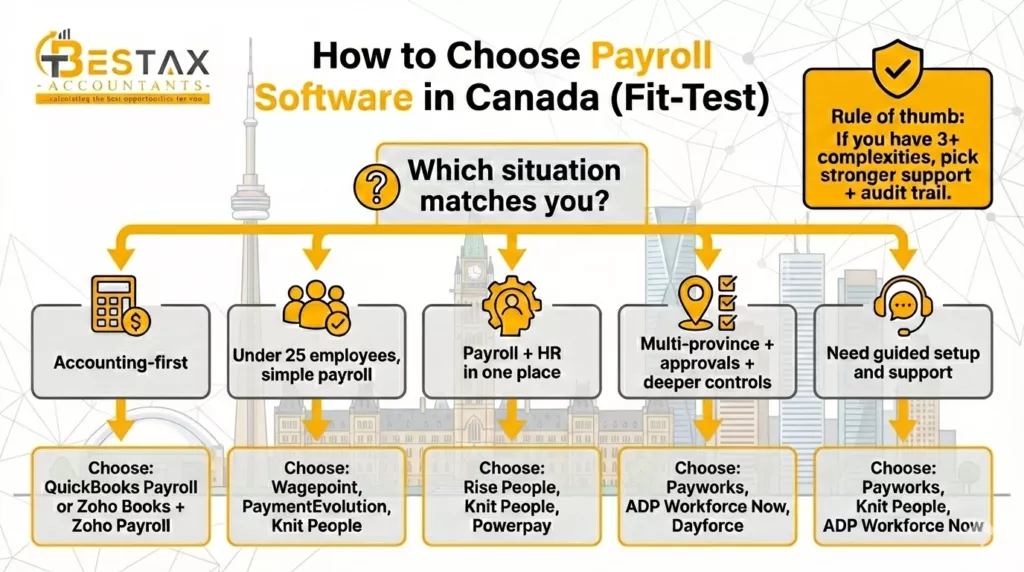
This section should feel like a short conversation, not a technical test. Keep it clear, and point back to the exact 10 tools above.
Step 1: Start with your “must-have” need.
If you want payroll tied closely to accounting, start with QuickBooks Payroll or Zoho Books + Zoho Payroll. That is usually the cleanest path for small company payroll and for reducing manual bookkeeping work.
Step 2: Match your team size and complexity.
If you are under 25 people and want simple payroll software, focus on Wagepoint, PaymentEvolution, or Knit People. If you want payroll plus HR basics, Rise People, Knit People, or Powerpay can make daily admin easier.
Step 3: If you have complexity, pay for support.
If you run multi-province payroll, have layered approvals, or need deeper controls, focus on Payworks, ADP Workforce Now, or Dayforce. Owners often regret buying cheap payroll software for small companies when complexity shows up later.
Quick Shortlist Table
Let’s take a quick look at all of the top payroll software at once, discovering what they are best at, their biggest benefits, pricing, and their considerable cons.
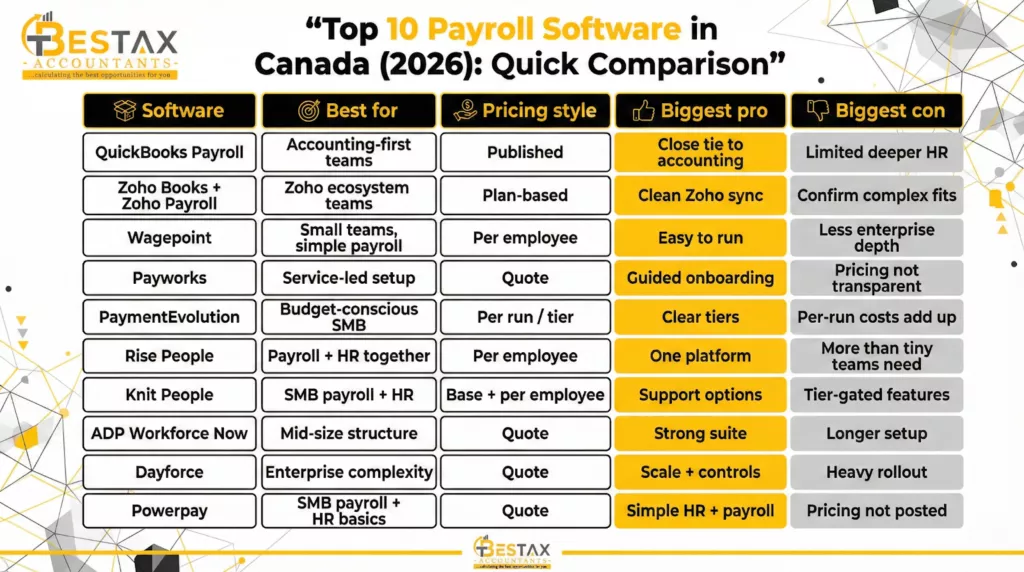
| Software | Best for | Pricing style | Biggest pro | Biggest con |
|---|---|---|---|---|
| QuickBooks Payroll | Accounting-first teams | Published plans | Close tie to accounting | Limited deeper HR |
| Zoho Books + Zoho Payroll | Zoho ecosystem teams | Plan-based | Clean Zoho sync | Confirm complex fits |
| Wagepoint | Small teams, simple payroll | Per employee | Easy to run | Less enterprise depth |
| Payworks | Service-led setup | Quote | Guided onboarding | Pricing not transparent |
| PaymentEvolution | Budget-conscious SMB | Per run/tier | Clear tiers | Per-run costs add up |
| Rise People | Payroll + HR together | Per employee | One platform | More than tiny teams need |
| Knit People | SMB payroll + HR | Base + per employee | Support options | Tier-gated features |
| ADP Workforce Now | Mid-size structure | Quote | Strong suite | Longer setup |
| Dayforce | Enterprise complexity | Quote | Scale + controls | Heavy rollout |
| Powerpay | SMB payroll + HR basics | Quote | Simple HR + payroll | Pricing not posted |
Switching Payroll Safely: The “Parallel Run” Method
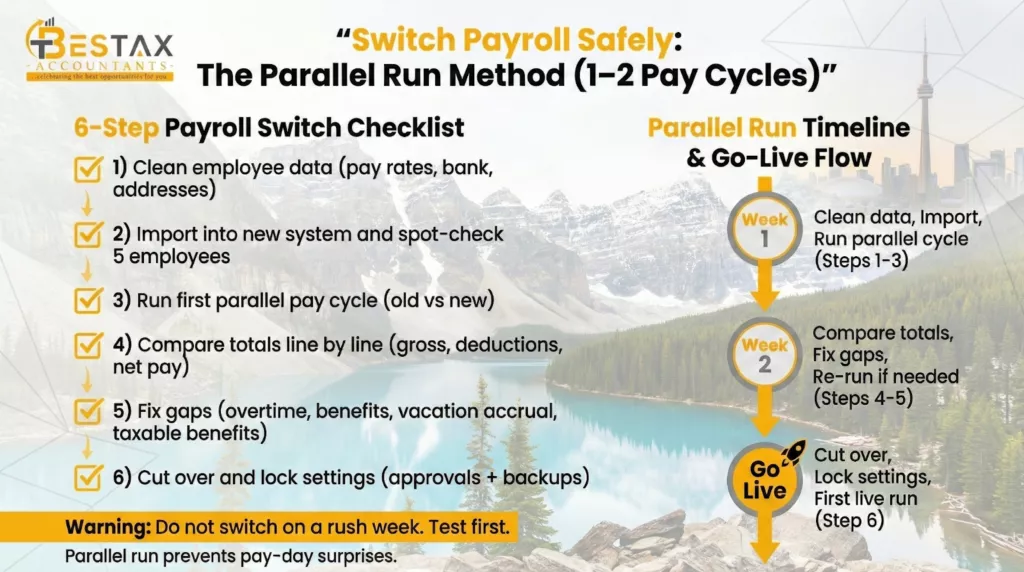
Switching payroll sounds scary because one missed detail can affect pay. The simplest safe approach is a “parallel run.” That means you run one or two pay cycles in the new system while you still keep the old system as a reference. You compare totals, fix gaps, then switch fully.
Keep this section very practical:
- Start by cleaning employee data (names, SIN, pay rates, bank details).
- Import data, then spot-check 5 employees, then 20%.
- Run payroll in both systems for 1–2 cycles and compare line by line.
- Lock the new system only after totals match and approvals are clear.
This is the section that makes your article different from list-style posts.
Payroll Compliance in Canada
This section should be longer and structured in clear sub-parts. It is where you build trust.
1) Set up employees correctly from day one.
Payroll software cannot fix a wrong setup. If you enter the wrong province, the wrong pay type, or the wrong benefit treatment, your reports will look clean but still be wrong. This is why payroll applications for small businesses need an approval step, even if the team is small.
2) Know what you must remit and when.
Most employers must remit source deductions to the CRA. If you remit late, CRA penalties can apply, and the CRA guide shows the rate can start at 3% and rise as high as 10% depending on how late the remittance is (and repeat behaviour).
3) Keep clean records that match your books.
Your business payroll software should produce reports that your accountant can reconcile to your bank and your general ledger. Build a habit: review totals each pay run, then review payroll expense monthly. This is where payroll software Canada businesses trust usually wins, because it makes audits and questions easier.
4) Year-end outputs and audit trail.
At year end, you need accurate summaries. You also need a trail of changes, especially if you adjust pay, bonuses, or taxable benefits. A clean audit trail reduces arguments, protects your team, and makes payroll software for small companies feel safer.
Implementation Timeline
Implementation time depends on data quality and complexity, not just the tool.
A simple team in one province can often go live in 3 – 10 business days, especially if you have clean employee data. Multi-province teams with mixed pay types usually need 2 – 4 weeks because rules and reports need testing. If you are rolling out HR workflows, permissions, and integrations, plan 4 – 8 weeks and include a parallel run.
In a Nutshell
Picking the best payroll software Canada businesses use in 2026 is less about hype and more about fit. Start with your workflow, check your complexity, then plan the switch with a parallel run.
If you want help choosing, setting up, or switching payroll software without errors, Bestax Accountants can support the process from setup to clean monthly reconciliation.
Quick FAQs
What is the best payroll software in Canada for a small business in 2026?
Start with your workflow. If you are accounting-first, QuickBooks Payroll or Zoho Books + Zoho Payroll is often the cleanest path. If you want a simple payroll tool for a small team, look at options built for smaller employers with clear workflows.
How much does payroll software cost in Canada per month?
Most pricing is a mix of a base fee plus per-employee pricing, and sometimes add-ons. The real total changes with pay frequency, employee count, time tracking, HR modules, and support level. Always estimate your “all-in” cost, not the entry price.
Which payroll software is best if I already use accounting software?
If you use QuickBooks, starting with QuickBooks Payroll can reduce double entry. If you use Zoho Books, Zoho Payroll keeps payroll and bookkeeping aligned. This matters most when you want cleaner month-end reporting.
What is the safest way to switch payroll software mid-year?
Use a parallel run for 1–2 pay cycles. Run payroll in both systems, compare totals line by line, then cut over only when numbers match. Keep backups of reports and approvals for every pay run during the switch.
What features matter most for Canadian payroll compliance?
Look for clean deduction handling, clear remittance reporting, strong audit trails, and role-based approvals. Also, look for reports your accountant can reconcile quickly. For many owners, support quality matters as much as features.
Disclaimer: The information provided in this blog is for general informational purposes only. For professional assistance and advice, please contact experts.