


If your finance team is still re-entering bank data by hand, chasing approvals through email, or spending hours on month-end reconciliation that should take minutes, the problem is not effort, it is process. Manual accounting slows every part of your reporting cycle, increases the chance of mistakes, and makes it harder to stay compliant when CRA or your stakeholders need answers fast. The shift toward accounting automation is not a technology trend for large enterprises. It is a practical response to a real pressure that every growing business eventually feels. This guide is built for 2026, not as a list of software options, but as a working roadmap for how to automate the right tasks, in the right order, without losing control of your numbers.
What Accounting Automation Really Means
Accounting automation uses software, logic rules, and connected systems to carry out accounting tasks without someone doing them manually each time. That covers a wide range of activity: pulling bank transactions automatically, matching invoices to purchase orders, categorizing expenses based on rules you set, sending payment reminders on a schedule, and generating financial reports at the push of a button.
What it does not mean is removing people from your finance function entirely. Automated accounting systems take care of the repetitive, rule-based work, data entry, reconciliation, classification, and document capture, so your team can focus on the work that actually requires judgment. It also goes well beyond bookkeeping. When it is set up correctly, it touches reporting, compliance, approvals, cash flow monitoring, and tax workflows. The scope is wider than most people expect when they first start looking into it.
Why Businesses Are Moving Fast on This in 2026
Several things shifted at the same time. AI-powered tools got significantly more capable at document recognition, transaction classification, and anomaly detection. Cloud accounting platforms expanded their native automation features. And finance teams across every sector felt the pressure of doing more reporting with the same number of people.
The other shift is around data expectations. Business owners and CFOs want real-time visibility into cash, payables, and revenue, not a monthly report that is already two weeks old by the time it lands. Manual processes cannot deliver that kind of speed without adding headcount. Automation can. That is why the conversation in 2026 is not whether to automate, but where to start and how fast to move.
Research from McKinsey Global Institute has shown that roughly 60 percent of occupations have at least 30 percent of activities that can be automated with current technology, and finance and accounting functions sit near the top of that list, given how much of the daily work is rule-based, repetitive, and data-heavy.
Start With Process, Not Software
This is the step most businesses skip, and it is the reason so many automation projects disappoint. If your current accounting process is messy, with duplicate vendor records, inconsistent expense categories, no clear approval path, then automating it just makes those problems faster and harder to catch. Software does not fix a broken workflow. It amplifies whatever is already there.
Before you look at any tool, map out how work actually moves through your finance function today. Where does manual data entry happen? What gets duplicated? What sits waiting for approval for days? Where do mistakes most often occur? Once you have a clear picture of the current state, you can design a better process first, and then automate that better process. Skipping this step is the single most common reason accounting automation projects fail to deliver real results.
How to Automate Your Accounting in 2026
Consider the following steps to automate your accounting.
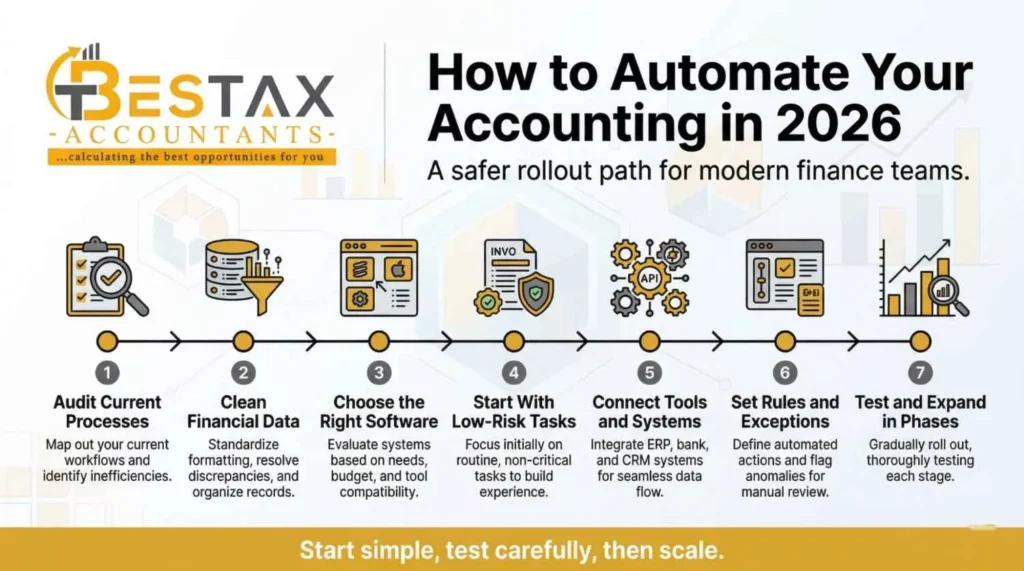
Audit your current accounting processes
The first step is an honest audit of your current workflows. Go through your chart of accounts, your expense categorization rules, your vendor and client records, and your bank reconciliation process. Note every place where a person is doing the same mechanical task more than once a week. That list is your automation target, but only after the next step.
Clean up your financial data first
Clean your financial data before you automate anything. Standardize your chart of accounts and naming conventions. Merge duplicate vendor and client records. Make sure transaction categories are consistent going back at least 12 months. This groundwork feels slow, but it is what determines whether your automated accounting software produces clean, trustworthy output or noisy results you have to review manually anyway.
Choose the right accounting automation software
Choose your software based on your actual workflow needs rather than features you saw in a product demo. Look for bank feed connectivity, automated reconciliation, invoice matching, built-in approval routing, reporting tools, and tax support. The best automate bookkeeping software for a 20-person professional services firm is not the same as what works for a multi-entity product company. Match the tool to the complexity of the process, not the other way around.
Start with low-risk repetitive tasks
Start with the lowest-risk, highest-volume tasks. These are the ones that offer immediate time savings and carry almost no risk of a significant error going unnoticed for weeks. Receipt capture, bank imports, recurring journal entries, invoice matching, and payment reminders are all solid starting points. Early wins matter here, they build internal confidence in the system and give you real data on where the process is working and where it still needs adjustment.
Connect your tools and systems
Connect your tools so that data moves cleanly between systems without manual re-entry. Your accounting software should be linked to your payroll platform, your bank feeds, your payment tools, and your reporting dashboards. Disconnected tools are one of the most common sources of duplicate work in finance departments, each one requiring someone to copy data from one place and paste it into another. Integration is not a bonus feature. It is core to what makes automation actually work.
Set rules, approvals, and exception paths
Set rules, approval levels, and exception paths before you go live at scale. Define which transaction types require a second review. Set dollar thresholds that trigger additional approval steps. Build clear escalation paths for unusual entries, high-value payments, and anything tax-sensitive. Without these boundaries, automated accounting systems can process incorrect or fraudulent transactions with no one noticing until the damage is done.
Test before you automate at scale
Test the workflow before you expand it. Run a small batch of real transactions through the automated process and check every output. Look for miscategorizations, missing data, broken approval routes, or entries that should have triggered an exception flag but did not. Adjust before you scale. This testing phase is where you find the gaps that were not obvious during setup, and it is far better to find them on ten transactions than on ten thousand.
Expand automation in phases
Once the initial workflow is stable, expand automation in phases. A sensible order is: capture first, then classify, then reconcile, then approve, then report, then review. Each phase builds on the one before it. Trying to automate reporting before reconciliation is clean, or approvals before classification rules are reliable, creates compounding problems that are harder to trace back to their source.
Connect Data, Systems, and Workflows Properly
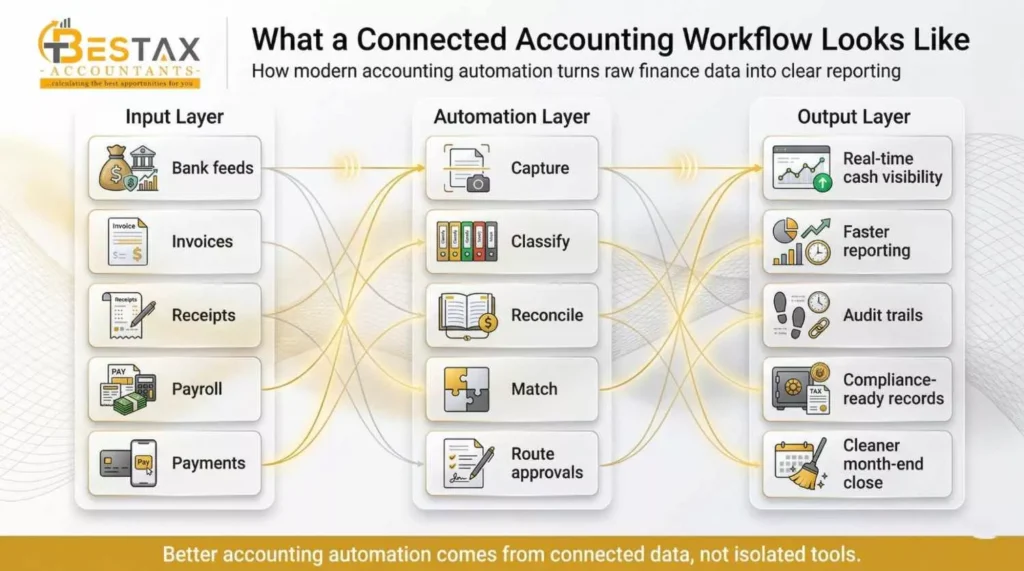
Automation produces its best results when every system involved in your finance workflow is sharing data in real time. That means your accounting platform, your payroll system, your bank feeds, your payment processor, and your reporting tools all communicate without someone manually moving data between them. When a supplier invoice is approved in your procurement system, it should flow into your accounting records automatically. When payroll runs, the entries should land in the correct accounts without a journal entry typed by hand.
For businesses in Canada, this connected approach also matters from a compliance perspective. Accurate, real-time data makes CRA reporting cleaner, payroll deductions easier to reconcile, and year-end preparation faster. If your bookkeeping and accounting records are not already structured to support this kind of connected workflow, working with a team of accounting specialists that offers bookkeeping services in Canada can help you set up the data foundation before automation is introduced.
Keep Human Review for High-Risk Work
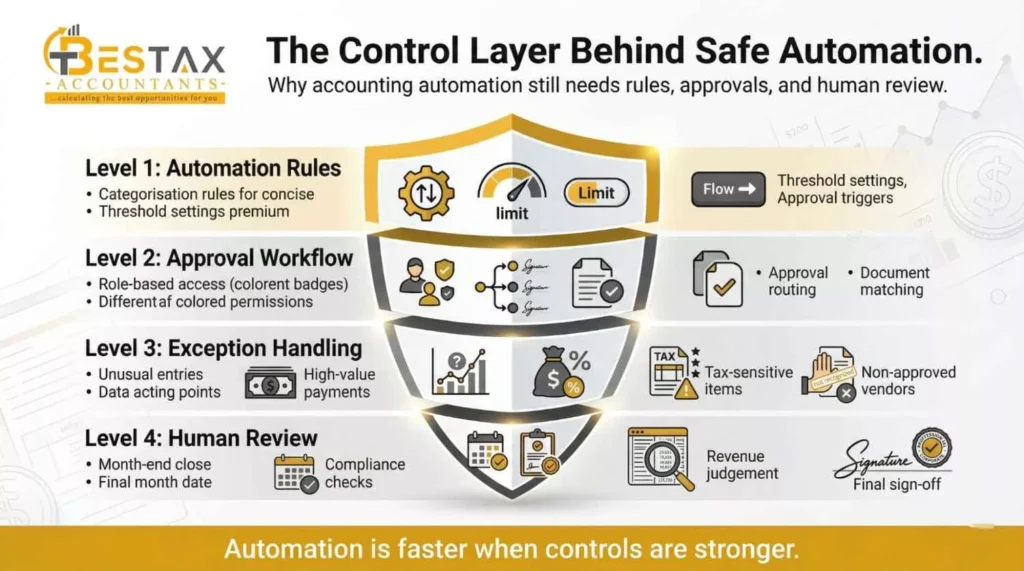
Automation is not the same as removing judgment from your financial process. The goal is to move repetitive, low-risk work off your team's desk, not to replace the thinking that catches problems before they become costly. Human review needs to stay in place for a specific set of tasks that automated systems are genuinely not equipped to handle on their own.
Month-end close, unusual transactions outside normal patterns, large outgoing payments, revenue recognition decisions, and anything touching tax-sensitive entries should all pass through a qualified set of eyes before they are finalized. The same applies to compliance checks and any adjustment entries that affect prior-period figures. Automated accounting systems flag these items when the rules are set correctly, but a person still needs to review the flag and make the call. That combination of automation and judgment is what makes a finance function both efficient and reliable.
Using AI and RPA With Clear Boundaries
Artificial intelligence adds value in accounting when it is applied to tasks where pattern recognition improves accuracy over time, document capture, transaction classification, and anomaly detection are the clearest examples. A well-configured AI layer in your automated accounting system will categorize 95 percent of routine transactions correctly and flag the remaining 5 percent for human review. That is a significant improvement over manual classification, where error rates tend to be higher and less consistent.
Robotic Process Automation, or RPA, handles the mechanical steps, pulling data from one system, formatting it, and placing it into another without any judgment involved. RPA is particularly useful for bridging gaps between older systems that do not have native integration options. It handles the repetitive steps accurately and quickly, but it does not adapt when the data or process changes. Both AI and RPA need clear rules, documented exceptions, and regular monitoring. Setting them up and walking away is where things go wrong.
Automate Reporting, Cash, and Compliance
Most businesses start their automation journey with data entry and reconciliation, and that is the right move. But the bigger payoff comes when automation extends into financial reporting, cash visibility, and compliance tracking. When your underlying data is clean and your systems are connected, generating a weekly cash position report or a monthly P&L should take seconds, not hours.
Automated cash flow monitoring gives finance teams and business owners something they rarely had with manual processes: an accurate, current picture of what is coming in and what is going out, updated without anyone manually pulling figures together. On the compliance side, automated audit trails and document matching mean that every transaction has a record attached to it, which makes both internal reviews and external audits considerably less stressful.
According to CPA Canada's digital reporting research, organizations that move to automated and connected financial reporting see measurable improvements in reporting speed and a reduction in manual errors, two outcomes that directly affect how reliably a business can meet its compliance and stakeholder obligations.
Build a Stronger Approval Workflow
Approval design is where accounting automation either holds up under pressure or falls apart. Role-based access controls who can view, enter, approve, and post transactions. Approval routing determines which transactions go to which level of the organization before they are finalized. Document matching ties every payable to a purchase order and a receipt before it clears for payment.
Exception escalation is the part that most businesses forget to design until something goes wrong. When a transaction does not match its expected parameters, an amount above a threshold, a vendor not on the approved list, or a transaction category that conflicts with the approval level, the system needs a clear path for where that item goes next. Without it, exceptions either clear automatically when they should not, or they sit in a queue until someone notices. Neither outcome is acceptable for a finance function that is trying to improve its controls.
Avoid These Common Automation Mistakes
Automating a broken process is the most expensive mistake on this list. If your expense categories are inconsistent, your vendor records are duplicated, or your approval process has no clear rules, automation will move those problems faster and further into your financial records. Fix the process first. Always.
Trusting default settings without reviewing them is another source of early problems. Software defaults are built for a generic business. Your business has specific categories, tax treatments, approval levels, and reporting needs that the default settings will not reflect correctly. Every rule that matters to your financial reporting needs to be configured deliberately, not assumed.
Skipping staff training, ignoring exception handling, and adding too many tools at once round out the list of mistakes that slow down or reverse the gains from automation. People need to understand what the system is doing and why, otherwise, they work around it rather than with it. Exceptions need a documented path, or they become manual workarounds that grow into shadow processes. Adding five new tools at once creates integration complexity that is harder to troubleshoot than a single tool added and stabilized at a time.
When to Get Professional Help With Automation
Some businesses are in a good position to set up basic automation internally. Others are not, and recognizing which situation you are in before you start saves significant time and money. If your books are behind, your chart of accounts is disorganized, your records have gaps, or you are dealing with multiple entities and complex tax workflows, trying to build automation on top of that foundation without outside support tends to make things worse before it makes them better.
Growth-stage businesses with rapid hiring, expanding revenue streams, or new geographic operations also tend to benefit from professional input at the setup stage. The decisions made when automation is first configured, how expenses are categorized, how payroll integrates with accounting records, and how reporting is structured affect every month of data that comes after them. Getting those decisions right with experienced support is faster than correcting them after two years of incorrect data have accumulated.
For businesses that need both the accounting foundation and the right automation structure, working with professionals who offer accounting services in Canada gives you the technical setup and the ongoing oversight in one place, rather than managing a software vendor and a separate accountant who may not be aligned on how the system should work.
Final Thoughts
Accounting automation in 2026 is not about replacing your finance team or buying the most advanced software on the market. It is about identifying the right tasks to automate, building the right process foundation first, and expanding in phases that keep your data accurate and your controls intact. The businesses that get the most from automated accounting systems are not the ones that moved the fastest. They are the ones who started with clean data, mapped their workflows carefully, and kept human judgment where it mattered most.
If you are ready to move forward but want experienced support on the setup, the structure, and the ongoing oversight, Bestax Accountants works with Canadian businesses on exactly this, from getting the books in order to building accounting workflows that actually hold up over time. Their team brings both the technical knowledge and the accounting expertise to make automation work in the real world, not just in a product demo.
Frequently Asked Questions
Accounting automation is the use of software, rules, and connected systems to perform accounting tasks automatically, without manual data entry each time. It covers a wide range of functions, including bank reconciliation, invoice matching, expense classification, payment reminders, financial reporting, and audit trail maintenance. The goal is to reduce repetitive manual work, improve accuracy, and give finance teams faster access to reliable financial data.
Bookkeeping automation reduces the time spent on data entry, cuts down on classification errors, speeds up reconciliation, and makes it easier to produce accurate financial reports on a regular schedule. For small and mid-sized businesses, the biggest practical benefit is that it frees up the hours that were previously spent on mechanical data work, so those hours can go toward reviewing results, managing cash flow, and making financial decisions. It also creates a cleaner audit trail, which helps with CRA compliance and year-end tax preparation.
There is no single best option, the right automated accounting software depends on your business size, the complexity of your workflows, and which systems you need it to connect with. Small businesses commonly use QuickBooks Online, Xero, or FreshBooks for their core accounting and automation features. Larger businesses or those with more complex operations often use platforms like Sage Intacct or NetSuite, which offer more sophisticated approval routing, multi-entity support, and deeper reporting automation. The best starting point is identifying your highest-priority workflows and finding software that handles those well, rather than choosing based on the longest feature list.
Start by auditing your current process to find where manual entry, repeated errors, and slow approvals are happening. Clean your financial data, standardize your chart of accounts, fix duplicate records, and make sure your categories are consistent. Then choose software that fits your workflow needs and begin with low-risk, high-volume tasks: bank imports, receipt capture, recurring journal entries, and payment reminders. Test the workflow on a small batch of transactions before expanding it. Add integration with payroll and payment tools once the core workflow is stable, and build approval rules and exception paths before automating anything that touches large payments or tax-sensitive entries.
No. Accounting automation handles the repetitive, rule-based parts of financial work. It does not replace the judgment required for tax planning, financial analysis, compliance decisions, exception review, and month-end close. What it does is remove the mechanical work that used to consume a significant portion of an accountant's time, which means they can spend more time on the work that actually requires expertise. The combination of a well-configured automated accounting system and a qualified accountant reviewing the output produces better results than either one alone.
Disclaimer: The information provided in this blog is for general informational purposes only. For professional assistance and advice, please contact experts

